
Note: This post contains affiliate links which I may earn a small commission from, at no extra cost to you.
There are very few things that I consider non-negotiable for new freelancers, but having a reliable VPN is definitely a must. If you’re planning on working remotely from public wifis, or you’re an expat living and working away from home, NordVPN can be a huge game-changer, or it was at least for me.
I’ve been a NordVPN customer for 2+ years, and in that time, it has improved my cybersecurity, content writing research, and even downtime. In this post, I’m sharing my in-depth NordVPN review, and why you should start considering a VPN ASAP.
Keep reading to learn:
- What is a VPN (and why do you need one)?
- My Freelancer NordVPN Review
- Why I Chose NordVPN Over Other Options
- My Remote Freelancer Software Kit

What is a VPN (and why do you need one)?
A VPN (or Virtual Private Network) is essentially an added security step to protect you and your data. In the simplest of terms, it acts as an in-between for your device and the internet, surrounding your transferred data with a secondary level of encryption.
What does this actually mean?
Whenever you click onto the internet, your device is more or less sending a request to the web destination, and they’re then replying with the webpage/data that you asked for. Without a VPN, someone could intercept this data exchange to steal, copy, or replace the information being sent and received.
You’re especially vulnerable when using public wifi because, in theory, anyone can access that router and therefore access your data. Private wifi, on the other hand, needs a password to connect to the router. Although don’t forget that if that password gets compromised, you’ll still be at risk.
As a freelance writer, I’m using public wifi all the time, and if you’ve found your way to this blog, I’m assuming you do too. From laptop-friendly cafes to coworking spaces or airport wifi, my devices (and data) are basically on display probably 50% of the time…or would be if I weren’t using a VPN.
Instead of the data exchange happening directly between my device and the internet, NordVPN steps in the middle. My device sends a request to NordVPN, they communicate with the web destination on my behalf, and then return the information from there, with encryption at every step of the way.
TLDR: NordVPN acts as a forwarding address that wraps my data in extra layers of protection, making it a whole lot harder to be read, stolen, or intercepted.

Check Out NordVPN
My Freelancer NordVPN Review
Now that I’ve shared what a VPN is and why I recommend using one, I want to jump straight into how NordVPN performs. I’ve been using NordVPN for 2+ years as an expat and remote worker in Japan, since way before this blog was even an idea, and I don’t plan on stopping anytime soon.
Here’s why:
How I Use NordVPN as a Remote Worker and Expat
Getting straight to the point, I think this is a great product. It seamlessly fits into my day-to-day life, and I use it across multiple devices for multiple uses. NordVPN not only makes me feel genuinely safer when working remotely, it also actively helps me in other areas of my personal and work life.
Here are just some of NordVPN’s uses:
- Securely using public wifi
- Adding data encryption
- Localising research (e.g., checking search results and product pricing in different countries)
- Comparing travel costs from different locations (yes, airlines change the cost of flights depending on where you are)
- Streaming international content from home
Experience
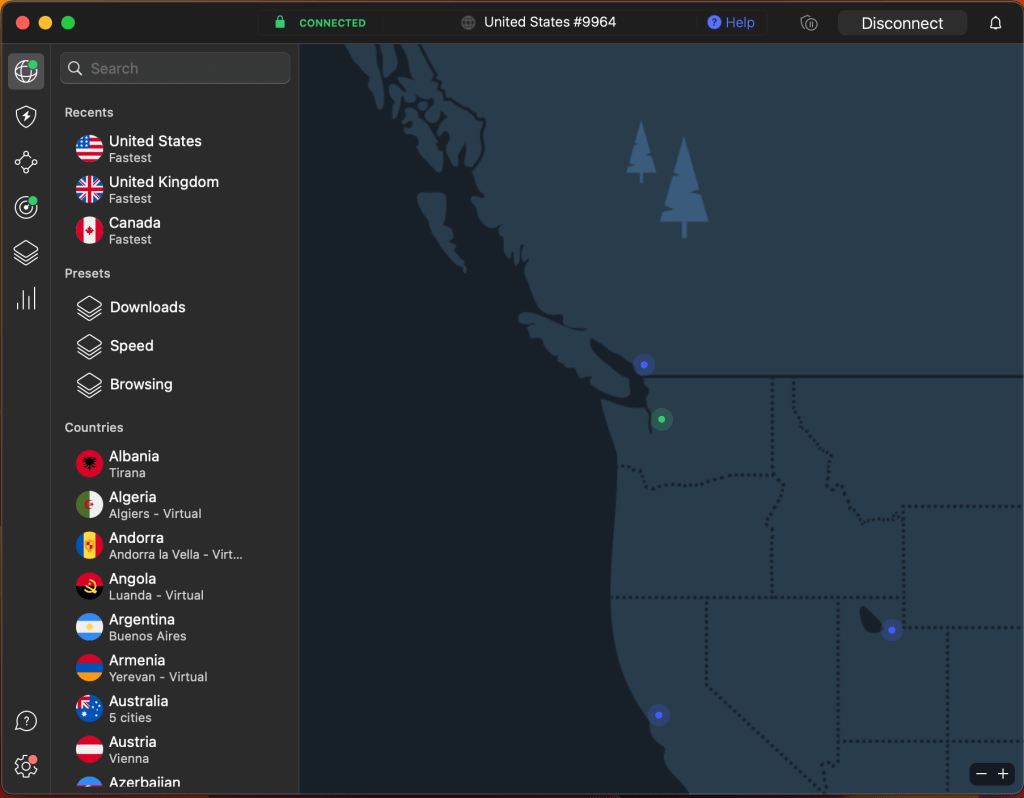
I really enjoy the user experience with NordVPN. I primarily use it on my MacBook (although not solely) for a super smooth VPN experience. After having installed the app onto my laptop, a little icon appears on the desktop’s menu bar.

I click this to connect and disconnect to the VPN, as well as change the VPN country I’m using.

Being able to do all this from the menu bar keeps things simple and seamlessly integrates with my daily workflow. I can also see with a quick glance at the icon if the VPN is on or off.
By opening the actual app on my laptop, I can access a bunch more information, although the only thing I actually use here is choosing specific VPN locations beyond just the country.
There are a few more steps involved with setting the VPN up on your devices, which you can get to grips with here.
Data Usage
Something I didn’t realise before getting NordVPN is that a VPN uses up more data than if you weren’t using it. This was never an issue for me when on public wifi, but when using it with my phone’s hotspot, it did cause a slight problem.
NordVPN estimates that the VPN requires an extra 5-15% of data, and 4-20% when used with cellular data (e.g., hotspotting from my phone). To be honest, using NordVPN has pushed my phone’s unlimited data into the throttling zone on more than one occasion.
That being said, this isn’t unique to NordVPN. All VPNs are going to require additional data usage in around the same range. If you need to use a VPN and a private wifi router at once, you could consider investing in a pocket wifi instead of using up your phone’s data.
Reliability
I have never personally had an issue with NordVPN. I find it to be reliable across any of their 7,700 different VPN servers, and when used from just about anywhere in the world – I’ve connected to NordVPN from locations across Europe, Asia, and North America with zero issues along the way.
In terms of data speed, I rarely notice a difference when the VPN is on or off. For my day-to-day work, I’m not uploading or downloading anything large enough for data speeds to be impacted, but for reference, NordVPN says that drops in speed by 10-20% can be normal.
The only time I’ve experienced issues with data speeds with NordVPN is when I’m streaming on already slow wifi, for instance, trying to stream from a hotel. I won’t lie, this can be a bit annoying, but I still think NordVPN is one of the fastest VPN options out there.
Pricing
Before we get into what I think of it, let’s establish how much NordVPN costs:
| Basic | Plus | Complete | Prime | |
|---|---|---|---|---|
| Monthly Plan | $12.99/month | $13.99/month | $14.99/month | $17.99/month |
| One Year Plan | $4.99/month | $5.99/month | $6.99/month | $8.99/month |
| Two Year Plan | $3.39/month | $4.39/month | $5.39/month | $7.39/month |
| Includes | Nord VPN for 10 devices | Password manager | 1 TB of encrypted cloud storage | Access to Nord Protect |
I have the Basic subscription, which works perfectly for my needs. $12.99/month covers all of my household’s devices (two iPhones, two MacBooks, an iPad, and an Apple TV) without even coming close to the device limit.
I particularly love that NordVPN outwardly lets you share your account with others. The only caveat is to make sure you’re doing this securely so that you don’t accidentally compromise the security you’re paying for.
I think the price is incredibly reasonable, especially if you’re able to commit to the one or two-year plans to cut the costs even more. You could also split this price by sharing the plan with a partner or roommates.
Looking for offline tools for writing?
12 Free Offline Writing Apps That All Freelance Writers Need
The complete guide to the best offline writing apps including writing platforms, thesauruses, and tools for writing in English as…
Why I Chose NordVPN Over Other Options
There are a huge number of VPNs on the market, with more appearing all the time. While I’m sure a lot of them are great, it is important to note that a VPN is not secure just because it’s a VPN. In fact, opting for a suspicious VPN can make you more vulnerable than not using one at all.
That’s why I recommend choosing an established VPN provider that comes with reviews and receipts. You know that NordVPN already has my vote of confidence, but here’s why I chose it in the first place:
- Trusted: A score of 4.2 on TrustPilot with 40,500+ reviews
- Established: NordVPN has 7,700 VPN servers across 118 locations
- Speed: Unique VPN protocols to prioritise fast speeds
- Secure: Integrated anti-malware tools
My Remote Freelancer Software Kit
NordVPN is a key player in my remote freelancer software kit, but it isn’t the only piece. Here are a few of my favourite tools for freelance writers:
Writing Software: Notion
Digital Portfolio: JournoPortfolio
Website Hosting: WordPress
To get more reviews and guides straight to your inbox, input your email in the box below.



 Gone Travelling Productions
Leave a comment